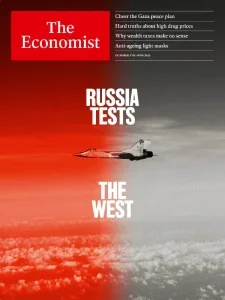
The Economist USA – 4 October 2025

The Economist USA – 4 October 2025
English | 80 pages | PDF | 36.7 MB

Summary of The Economist – October 4th-10th 2025

This issue of The Economist, dated October 4th-10th, 2025, covers a range of global political, economic, scientific, and cultural topics, with a particular focus on international relations, technological advancements, and economic trends.

Geopolitical Tensions and Hybrid Warfare

  • Russia’s Grey-Zone Campaign: Russia is engaged in a ‘grey-zone campaign’ against NATO, characterized by actions such as drone incursions, cyber-attacks, and propaganda, designed to destabilize Europe and undermine NATO’s unity . These actions are seen as a calibrated effort to unsettle Europe without direct conflict . The goal is to weaken NATO’s resolve and support for Ukraine, as well as to sow discord within Western nations .
  • Escalation Management: The publication emphasizes the need to relearn Cold War-era escalation management strategies to address current hybrid warfare tactics . Swift attribution and publicizing of sabotage, cyber-attacks, and election interference, along with strengthening resilience in infrastructure and electoral commissions, are crucial responses .
  • Shadow Fleets: Russia’s ‘shadow fleet’ of vessels, some suspected of spying and sabotage, poses a new danger on the seas, particularly in the Baltic . These vessels often operate under false flags or without proper identification to evade sanctions and conduct illicit activities .

Economic and Social Trends

  • Self-Driving Vehicle Revolution: The adoption of robotaxis is accelerating, particularly in cities like San Francisco and Shenzhen, with millions of trips conducted by Waymo and Baidu . These vehicles are noted for having fewer accidents than human drivers and potentially saving lives . However, regulatory hurdles and concerns about job displacement for human drivers persist .
  • Drug Pricing in America: The issue highlights the ongoing debate about high drug prices in the United States. Donald Trump’s administration proposes pegging drug prices to the lowest charged in other rich countries, but this approach is criticized as potentially harming innovation and leading to worse care .
  • Wealth Taxes: Arguments for wealth taxes are discussed, with economists and politicians debating their effectiveness and potential drawbacks. While some see them as a way to address fiscal gaps and social inequality, concerns about their practicality, impact on wealth migration, and potential for economic damage are raised .
  • China’s Economic Shifts: China’s economy is undergoing a transition from manufacturing to services, with a focus on engineering and technology. The government aims to build a ‘complete’ industrial system and is investing heavily in advanced IT skills . However, there are challenges related to industrial overcapacity and a reluctance among young people to pursue manufacturing jobs .

Political Developments

  • US Supreme Court: The Supreme Court’s upcoming term is expected to clarify areas of law related to presidential power, with some cases potentially expanding the president’s authority . The use of the ‘shadow docket’ for significant rulings without full public hearings is also a point of concern .
  • Gaza Peace Plan: A 20-point plan for ‘eternal peace’ in Gaza, proposed by Donald Trump, is presented as a significant step forward, aiming to end the conflict, release hostages, and establish a technocratic Palestinian committee . The plan has broad support among Israelis but faces opposition from far-right elements and uncertainty regarding Hamas’s cooperation .
  • Japanese Politics: Japan’s ruling Liberal Democratic Party (LDP) is facing a leadership race amid a crisis of public trust and declining support. The candidates represent differing visions for the party’s future, with challenges including inflation and the need to address changing public sentiments .

Science and Culture

  • Military Ballooning: Old technology is finding new uses, as armies are turning to military balloons for surveillance and communication, particularly in detecting low-flying threats and acting as signal relays .
  • Anti-ageing Light Masks: Red-light face masks, using LED technology, are gaining popularity for their purported anti-ageing benefits, stimulating skin regeneration and combating wrinkles .
  • Chinese Wine Industry: China is making significant strides in fine wine production, with Ningxia emerging as a key region. Despite growing international recognition and quality, challenges remain in market penetration and cultural acceptance against traditional beverages .

In summary, this issue of The Economist provides a comprehensive look at the complex interplay of global power dynamics, economic shifts, and societal changes, highlighting both emerging challenges and innovative solutions across various sectors.

The 5 Best PDF Readers for Digital Magazines in 2026

Reading digital magazines on a screen is a completely different experience from reading on paper — and the right PDF reader can make or break that experience. Whether you're flipping through a glossy fashion magazine, a dense technical journal, or a comic-style publication, your reader app affects everything from page-turn smoothness to night-time eye comfort.

Here's our breakdown of the five best PDF readers for digital magazine lovers, complete with pros, cons, and who each one is best suited for.

1. Adobe Acrobat Reader

The industry standard, and for good reason.

Adobe Acrobat Reader remains the gold standard for PDF viewing across desktop, mobile, and web. For digital magazines packed with embedded fonts, vector graphics, and interactive elements, Acrobat renders everything with pixel-perfect accuracy.

✅ Pros

  • Universal compatibility — opens any PDF without rendering issues
  • Liquid Mode reflows magazine layouts for small screens
  • Cloud sync across devices
  • Free annotation and highlighting tools

❌ Cons

  • Can feel heavy/slow on older devices
  • Frequent update prompts
  • Some premium features locked behind subscription

Best for: Readers who want maximum compatibility and don't mind a slightly heavier app.

2. Xodo PDF Reader & Editor

Lightweight, fast, and beautifully minimal.

Xodo has become a favorite among magazine readers who want speed without sacrificing features. It's completely free, ad-light, and handles large magazine files (100MB+) without lag.

✅ Pros

  • Blazing-fast page rendering, even for image-heavy issues
  • Dual-page "spread" view for tablets — mimics a real magazine
  • Excellent night mode with adjustable warmth
  • Free cloud storage integration (Google Drive, Dropbox, OneDrive)

❌ Cons

  • Mobile-only focus (desktop version is more limited)
  • Fewer advanced editing tools than Acrobat

Best for: Tablet readers who want that authentic "two-page spread" magazine feel.

3. Foxit PDF Reader

The power-user's choice.

Foxit strikes a great balance between performance and features. It's particularly popular for magazines that include forms, hyperlinks, and bookmarked sections (common in tech and business publications).

✅ Pros

  • Extremely fast startup and load times
  • Excellent bookmark/table-of-contents navigation
  • Built-in PDF compression (great for archiving large magazine collections)
  • Strong security features (password protection, redaction)

❌ Cons

  • Interface feels slightly more "corporate" than reader-focused
  • Some tools require Foxit PDF Editor (paid)

Best for: Readers who download and archive large magazine libraries.

4. SumatraPDF

Minimalist. Lightning-fast. Open-source.

If you're a desktop reader on Windows who values speed above all else, SumatraPDF is unbeatable. It opens instantly, has zero bloat, and supports keyboard-driven navigation perfect for power-reading through issue after issue.

✅ Pros

  • Opens massive PDFs almost instantly
  • Tiny install size (a few MB)
  • Continuous scroll mode great for long-form magazine articles
  • Free, open-source, no ads ever

❌ Cons

  • Windows-only
  • No cloud sync
  • Very basic annotation tools

Best for: Windows users who binge-read magazine archives and want zero friction.

5. Apple Books / Preview (macOS & iOS)

Seamless if you're already in the Apple ecosystem.

For iPhone, iPad, and Mac users, the built-in PDF tools in Apple Books and Preview offer a surprisingly polished magazine-reading experience — especially with iPad's larger screen and Apple Pencil annotation support.

✅ Pros

  • Beautiful, distraction-free reading view
  • Seamless iCloud sync across all Apple devices
  • Apple Pencil markup feels natural for notes/highlights
  • No installation needed — it's already there

❌ Cons

  • Apple ecosystem only
  • Limited file management compared to dedicated PDF apps
  • Fewer customization options for page layout

Best for: iPad readers who want a clean, native experience with zero setup.

Quick Comparison Table

ReaderPlatformBest FeaturePrice
Adobe Acrobat ReaderAllLiquid Mode reflowFree / Premium
XodoMobile/TabletTwo-page spread viewFree
Foxit ReaderDesktopTOC navigation & compressionFree / Pro
SumatraPDFWindowsSpeed & minimalismFree
Apple Books/PreviewApple devicesNative iCloud integrationFree

Final Thoughts

There's no single "best" PDF reader for everyone — it really depends on your device and reading habits:

  • Tablet flippers → go with Xodo
  • Windows speed-readers → go with SumatraPDF
  • Apple users → stick with Apple Books
  • Archivists & collectorsFoxit is your friend
  • Need it to "just work" everywhereAdobe Acrobat

Whichever you choose, downloading high-quality digital magazine PDFs is the first step to a great reading experience — and that's exactly what we're here for.

Want more reading tips and the latest free magazine downloads? Browse our growing archive and find your next favorite issue today.

Leave a Comment